
AWS recently announced the general availability of its DevOps Agent, an agent that can investigate incidents, analyze logs, and suggest fixes, I wanted to see how far it actually goes when something breaks in production.
What AWS DevOps Agent Promises
At a high level, AWS DevOps Agent is positioned as an AI powered operations assistant, one that can investigate incidents and help teams resolve them faster.
According to AWS, it can:
- Automatically investigate incidents as soon as alerts are triggered
- Analyze logs, metrics, code, and configurations across our environment
- Correlate signals across services to identify potential root causes
- Provide detailed mitigation plans, including steps to resolve and validate fixes
- Coordinate incident response by sharing findings on Slack or ServiceNow
- Recommend improvements based on past incidents to prevent future failures
AWS describes it as an alway on, autonomous teammate, one that can continuously monitor our systems, understand what’s happening, and guide us toward resolution.
On paper, the promise is cool:
Instead of spending time figuring out what went wrong, the agent helps us by telling us how to fix it.
Scenario: What Happens When Something Breaks at 3AM?
In this scenario, we’re simulating a Kubernetes incident where multiple services are stuck in CrashLoopBackOff. From the outside, they all look the same: pods keep crashing and restarting. But each one is failing for a different reason.
That’s the problem, CrashLoopBackOff is a symptom, not a diagnosis.
Normally, we would jump between logs, events, and YAML to figure it out. Instead, we’ll use AWS DevOps Agent to investigate the root causes.
Once the investigation starts, AWS DevOps Agent moves quickly.
Instead of manually digging through logs and events, it surfaces clear findings across all failing services. Even though every pod is stuck in CrashLoopBackOff, the agent correctly identifies that each one is failing for a completely different reason:
One service crashes immediately due to a broken container entrypoint
Another fails because of a misconfigured liveness probe
A third is being killed due to insufficient memory limits
What’s notable here is the level of clarity.
Rather than showing raw logs or scattered signals, the agent presents each issue as a structured finding, explains the root cause, and ties it directly to the Kubernetes configuration causing the failure.
Within minutes, the investigation goes from “everything is broken” to a clear understanding of exactly what’s wrong in each service.
The investigation itself is also structured in a way that’s easy to skim through.

Each issue is broken down into a clear finding, with context about what’s happening and why it’s causing the failure. Instead of piecing things together manually, we get a direct explanation tied to the exact misconfiguration.
The agent then consolidates everything into a single summary.
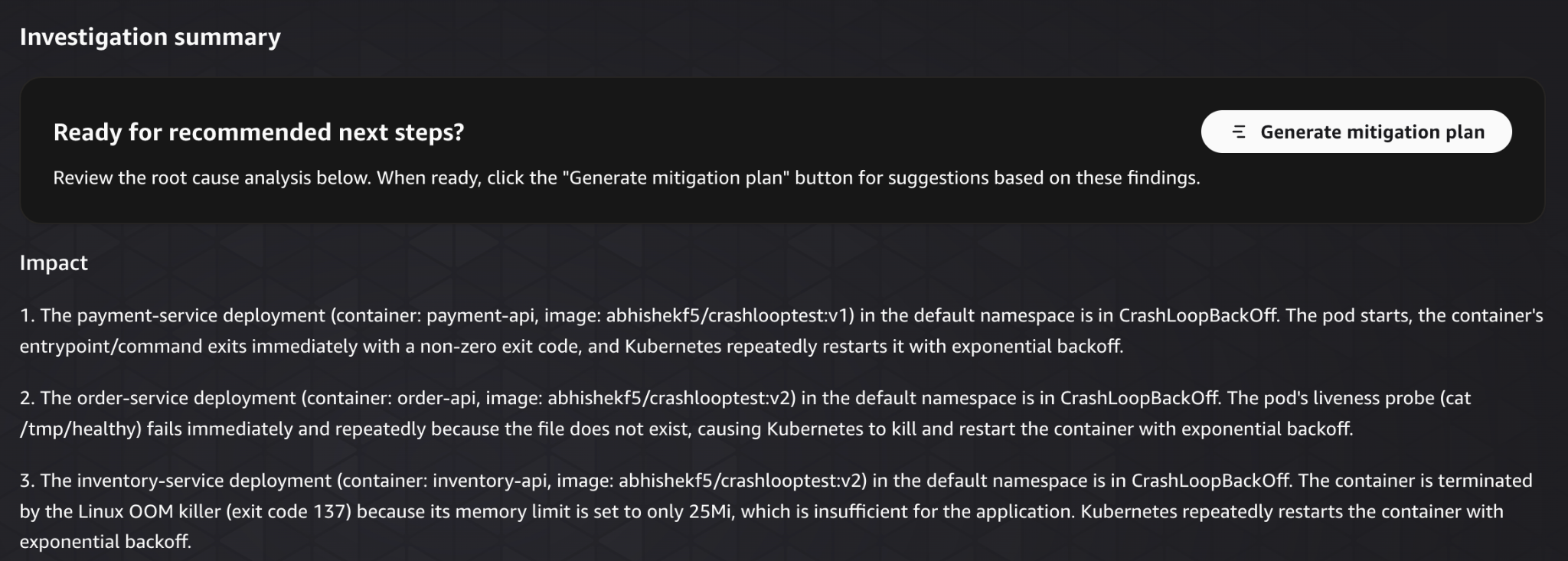
This is where it becomes especially useful. Rather than treating the incident as one large failure, it separates it into distinct root causes and explains them in one place.
At this point, the investigation is essentially complete.
We are not guessing, and we are not wasting time correlating signals manually. We have a clear view of:
- What’s broken
- Why it’s broken
- Where the issue exists
The entire process took us minutes.
What would normally involve jumping between multiple tools, inspecting logs, and iterating through hypotheses is reduced to a single, structured output.
For incident investigation, this is a significant improvement.
With the root causes identified, lets see what the agent recommends for fixing them in the mitigation plan tab.
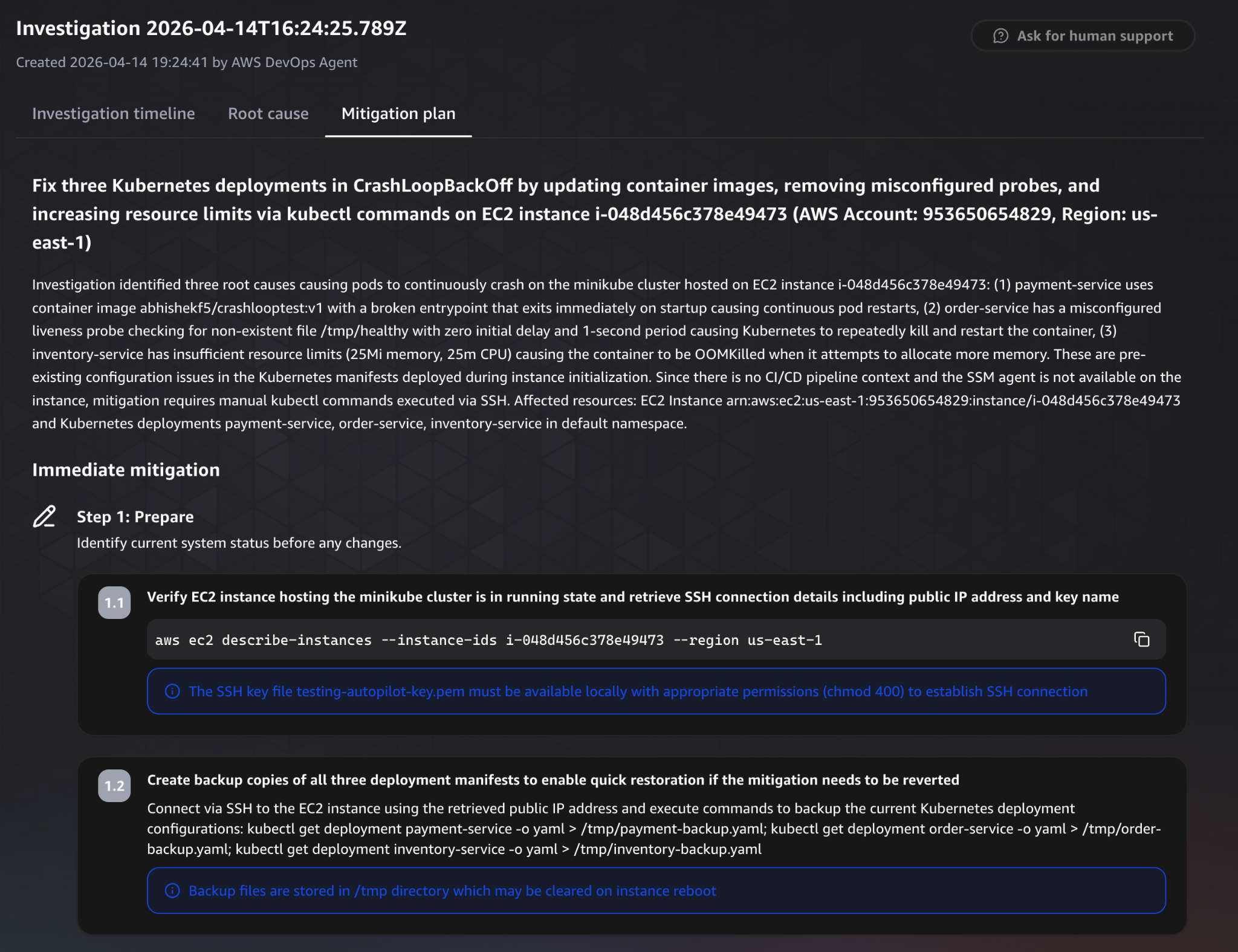
The mitigation plan starts with a high level summary of what needs to change.
It clearly outlines the actions required to resolve all three issues, updating the container image, fixing the liveness probe, and increasing resource limits. At a glance, it connects each root cause to a corresponding fix.
The plan is then broken down into structured steps.
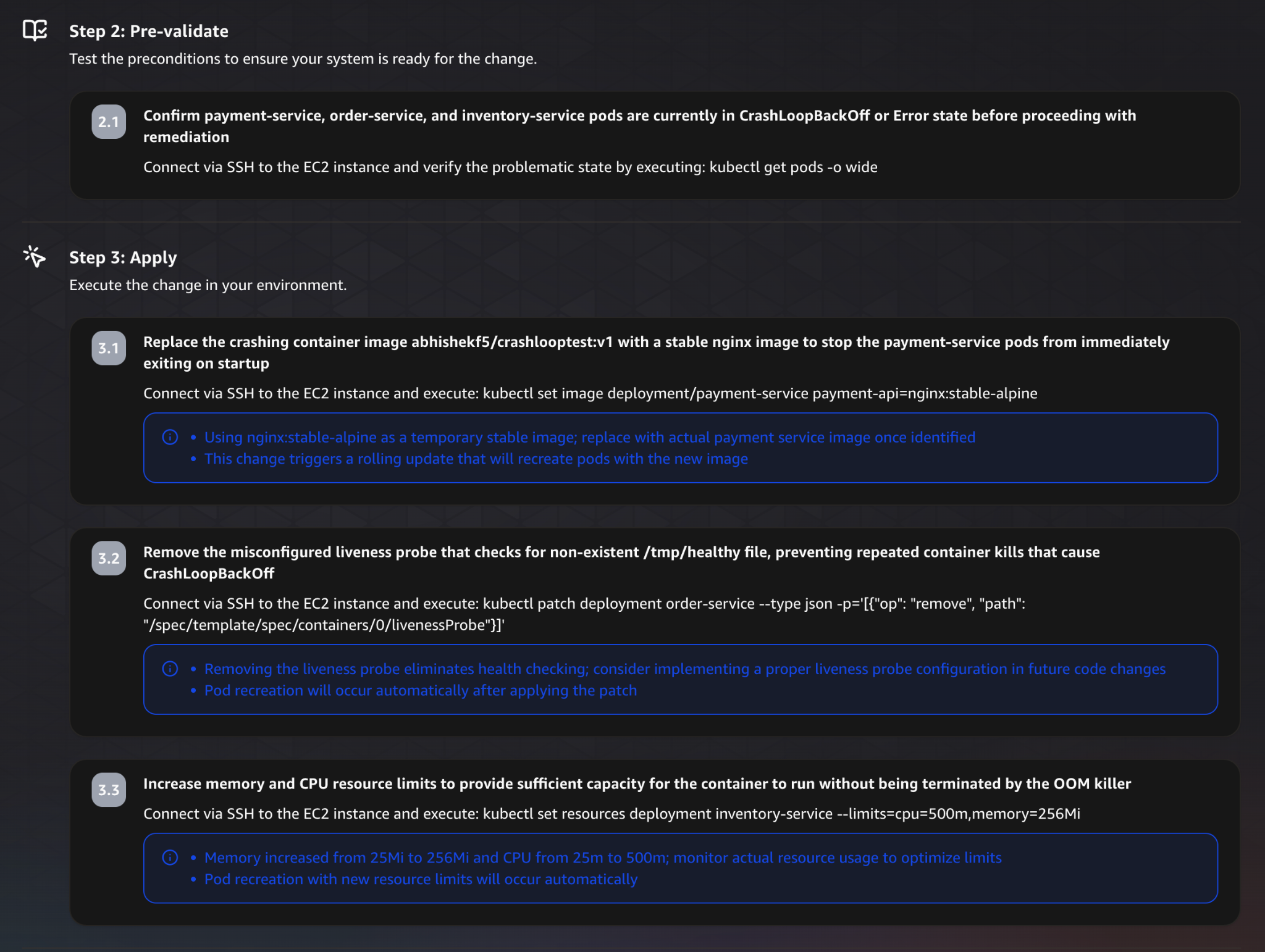
It begins with preparation and validation steps, making sure the system is in the expected state before applying any changes.
This includes verifying the EC2 instance, connecting via SSH, and confirming that the affected services are still in a failing state.
These steps are important, they reduce the risk of applying changes blindly.
Next comes the actual remediation.
For each issue, the agent provides explicit commands to resolve it:
- Replacing the broken container image
- Removing the misconfigured liveness probe
- Increasing memory and CPU limits
Each fix is tied directly to the root cause identified earlier, which makes the plan easy to follow.
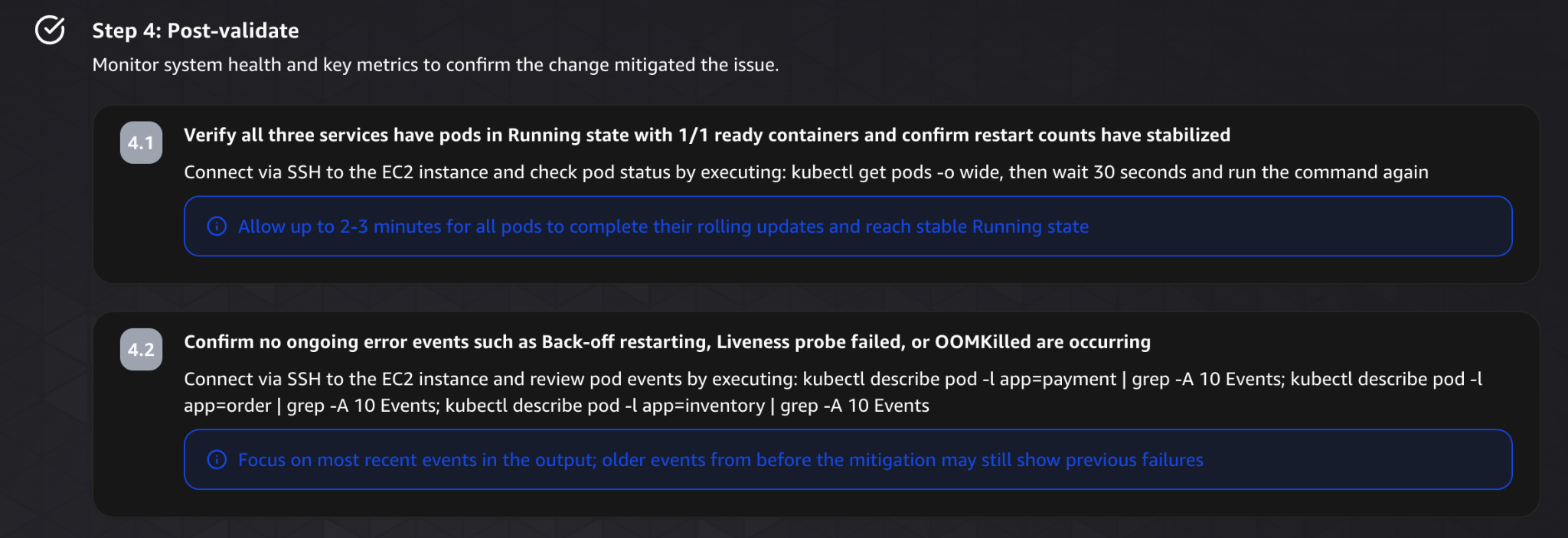
After applying the changes, the plan moves into validation.
It suggests verifying that all services are back to a healthy state, checking pod status, and confirming that error events are no longer occurring.
This ensures the fixes actually resolved the issue, not just masked it.
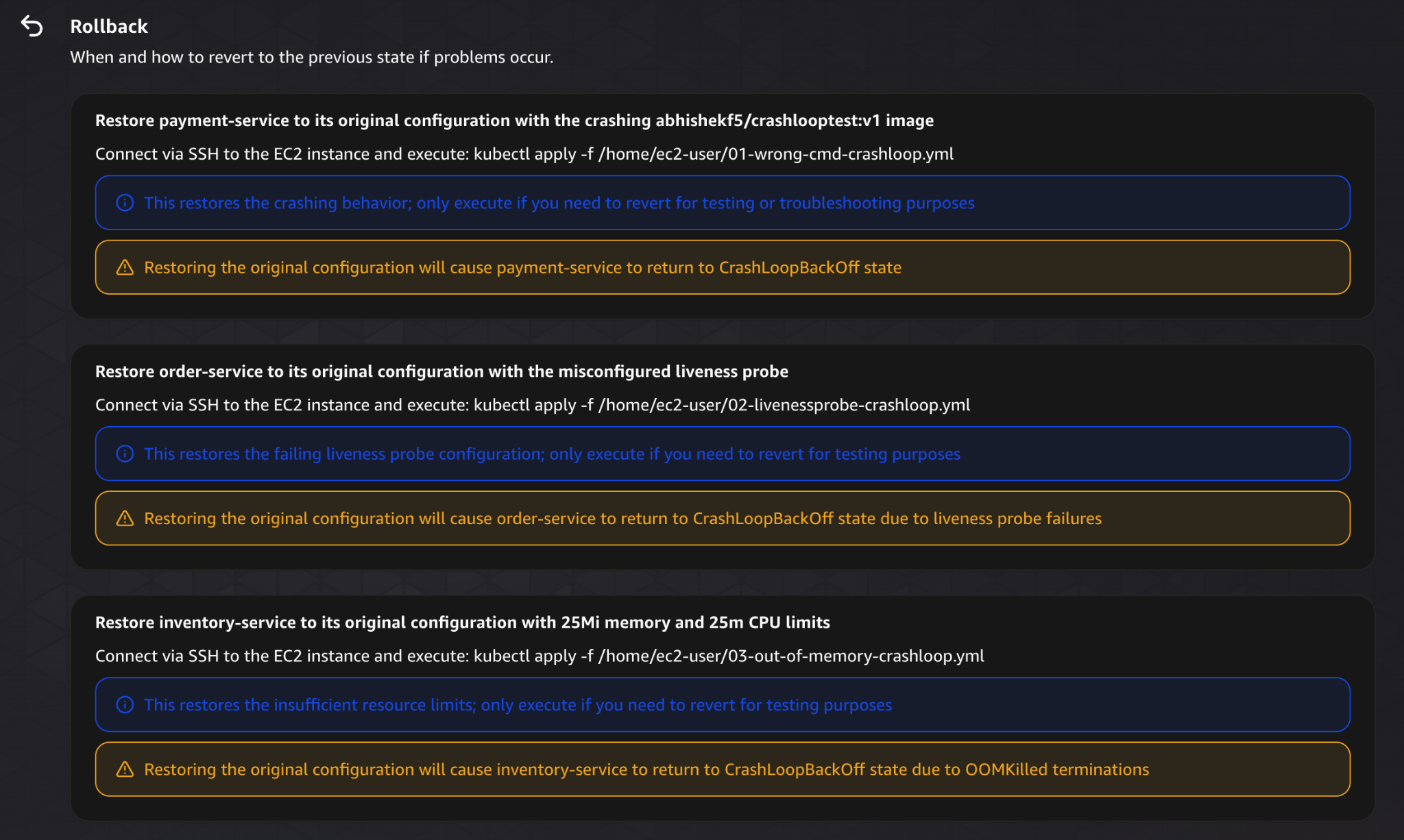
The plan also includes rollback instructions.
If something goes wrong, it provides clear steps to revert each change and restore the system to its previous state.
This is a critical part of safe operations, and it’s good to see it included.
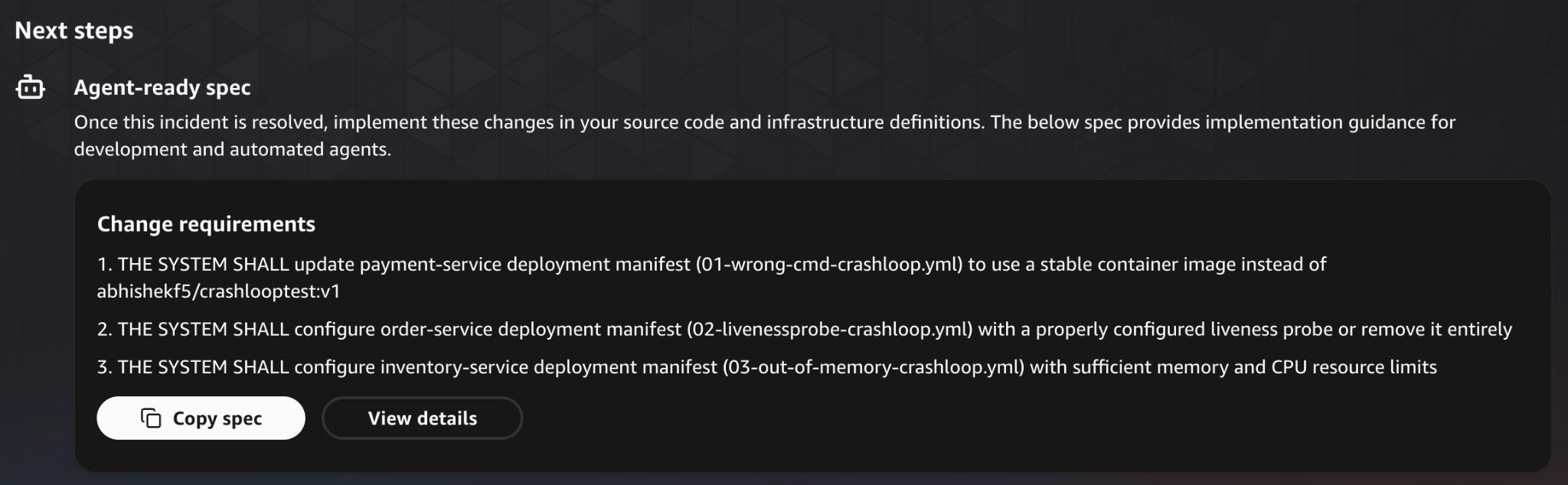
Finally, it suggests what to do next.
Instead of stopping at the immediate fix, it recommends updating the source configuration to prevent the issue from happening again.
Now let’s take a look at some of the integrations it has.
Integrations
AWS DevOps Agent works best inside AWS, but it also support other services and cloud providers.
It can pull data from services like CloudWatch, EC2, and Kubernetes, and can also connect to things like Azure or observability tools like Datadog. It integrates with Slack and ServiceNow too, so findings show up where your team already is.
So it’s not locked into AWS, which is good, and you can always add MCPs.
Security & Access Model
AWS DevOps Agent builds on top of the existing AWS security model.
It uses IAM roles to control access, so it can only reach what you explicitly allow, following least privilege principles. On top of that, AWS adds internal controls to limit how those permissions are used during investigations (as mentioned in the AWS DevOps Agent security docs).
Agent Spaces act as boundaries around what the agent can actually see and operate on, defining which accounts, resources, and integrations are in scope.
Also data is encrypted in transit and at rest, and every action is logged in CloudTrail, so you always have an audit trail.
What I Liked
I really liked the investigation since normally i am jumping between logs, metrics, and configs trying to piece together what happened. The agent pulls it all into one place and walks you through it. What would’ve taken an hour of manual digging becomes something you can actually follow.
The thing that impressed me most was how it explains findings rather than just dumping data at me. Every issue gets tied to a root cause and the specific config behind it. In our test, what looked like one problem turned out to be three completely separate issues, and it laid them out cleanly, one by one.
The mitigation plan surprised me too. I expected high level suggestions. but it was a step by step plan with exact commands, validation steps, and rollback options.
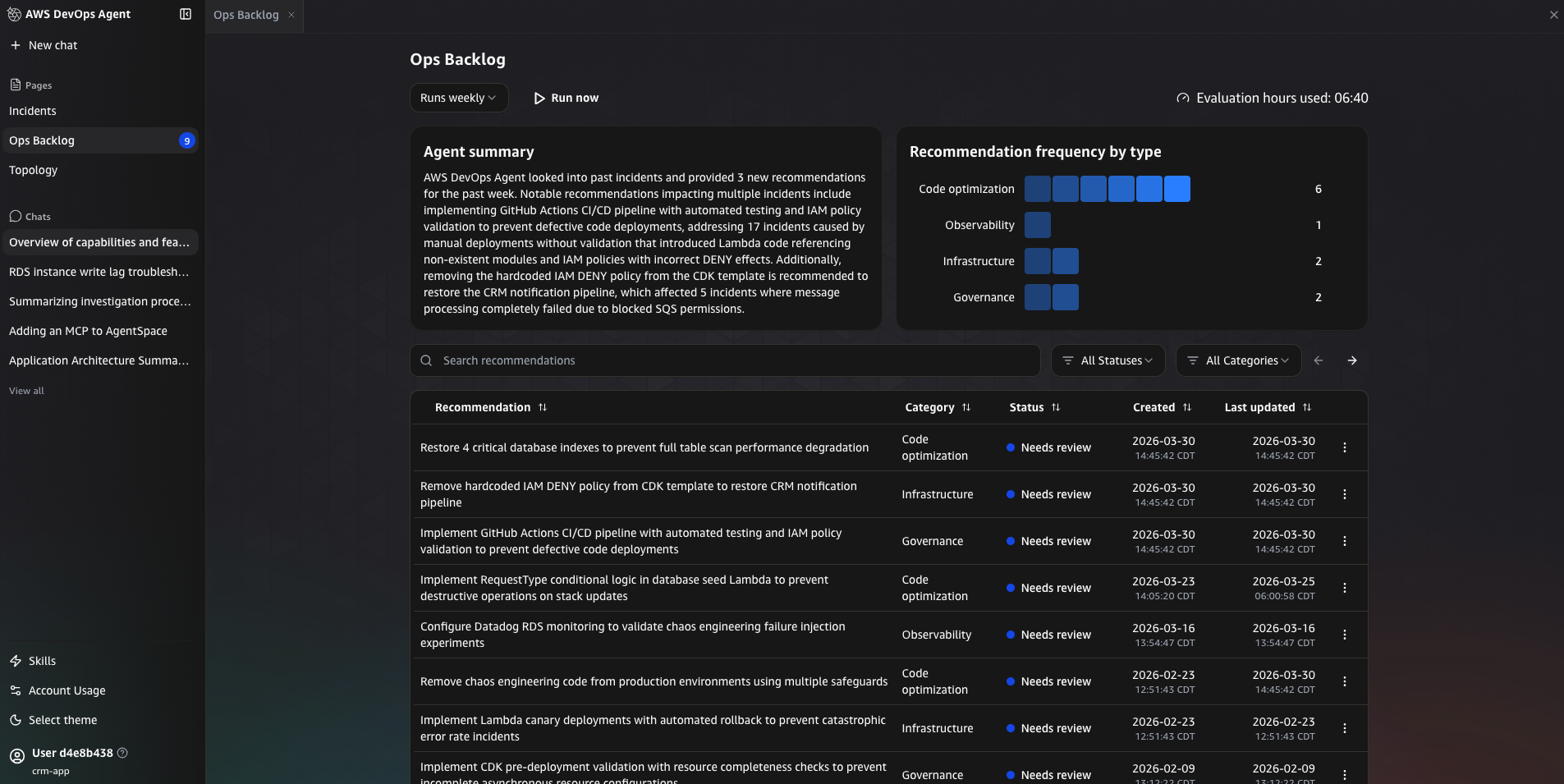
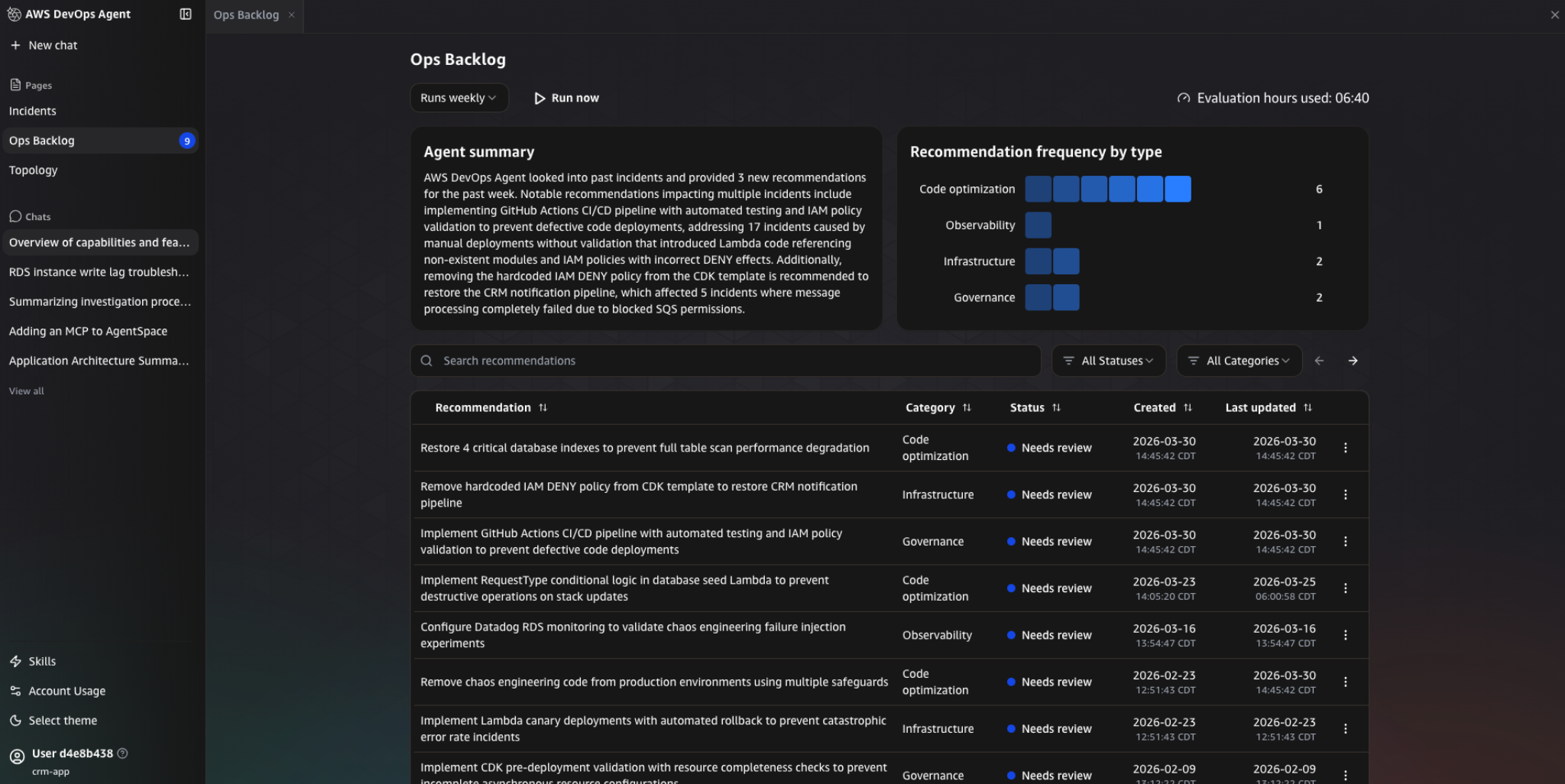
I also liked that it learns from the past incidents, as it looks at previous incidents and show recommendations in the Ops Backlog. Things like improving CI/CD pipelines, fixing IAM policies, or adding validation checks, which is really cool.
What Can Be Improved?
The bottleneck comes after the investigation, The agent knows what’s broken. It knows how to fix it. But it hands the fix back to you and waits. That gap between “here’s the plan” and actually running it is where a lot of the time savings get eaten back up.
Also what happens if the incident happens at 3am?
You still have to wake up, go through the plan, and run the commands yourself.
Another thing is integrations.
The agent integrates well with AWS and some external tools, but it’s still limited in terms of what it can actually do across systems.
Compared to other agents, which are designed to operate across different environments, the integrations here feel more focused on visibility than control.
So you end up in this situation where:
- The agent understands the problem
- The agent knows the fix
- But the agent doesn’t execute it
Conclusion
AWS DevOps Agent is good at incident investigation. It takes what’s usually a chaotic, like context switching and troubleshooting and gives you something structured, clear root causes, detailed mitigation plans, and all of it in minutes rather than hours.
The gap is what happens after.
The agent knows what’s wrong. It can tell you exactly how to fix it. But it won’t fix it. There’s still a handoff back to the engineer.
So it makes incidents easier to understand, it just doesn’t make them faster to resolve.
Tools like Stakpak are focusing on that next step more directly. it’s open source and vendor neutral, The focus there isn’t just investigation; it’s actually operating infrastructure and applying fixes safely.
The real question for any of these tools isn’t whether your system can explain what went wrong.
It’s whether anything actually happens next.